![engin_spark_logo_800x272.png]](https://support.engin.co/hs-fs/hubfs/Logos/engin_spark_logo_800x272.png?height=40&name=engin_spark_logo_800x272.png)

Introduction to Suzy
Hi, I’m Suzy™, engin’s fully integrated AI recruiting assistant, who is trained on your company information, job description, and general industry knowledge to automate your top applicant screening process using customized questions you’ve predetermined. I’m here to take care of the ground work so that you can focus your time and attention on only the best candidates, as well as other important tasks in your day. Let me help improve the efficiency of your hiring process times ten by freeing up your time, making contact with every candidate, and dramatically reducing your time-to-hire.
How can I help?
When activated, as soon as a candidate applies to a new job, I will reach out via text message to complete a phone screen at their convenience. If I don’t hear back from the applicant or they forget about the message, I’ll even send them a follow-up text to remind them to take the next step in their application process. Already have a job listed on the engin platform with candidates that you would like me to screen? If I’m tagged on a previously active job, I’ll reach out to all of the candidates that you are considering at one time and begin screening them as each of them respond.
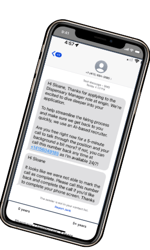
Once I’m enabled, I never sleep – in fact, typically 68% of all of the phone screens I complete are after conventional business hours or on the weekends. Together, we’ll never let great talent slip through the cracks.
Upon completion of a phone screen, a complete summary of the answers to the questions, full written transcript, and audio of the call are uploaded into the applicant’s profile under the Screen tab, with an option to receive a copy of the call digest via email as well. The candidate’s status will also be changed to Screened, letting users of the platform know this individual has completed a phone screen with me and the results are ready to review.
.png?width=586&height=297&name=unnamed%20(4).png)
Step-by-step guide to get started
Your first step is to contact CustomerSuccess@engin.co and let us know you’d like to enable Suzy. The one-time process usually takes 24-48 hours to complete initial activation and won’t need to be repeated in the future.
NOTE If you’d like to begin screening candidates for a brand new job listing, first create and activate the job on the platform and then follow the same steps below.
1 To start screening candidates from a previously active job with existing candidates, from the Jobs page click into the specific job listing, then click the Screening tab. This action can be taken while a job is active or inactive.
2 The Screening page will initially portray the default questions that engin has provided for Suzy to ask on a typical phone screen. The first step allows the user to add, remove, or edit the questions that you would like Suzy to ask each applicant. In addition, decide the order in which the questions are asked by clicking the icon to the left of each question and dragging its position up or down.
IMPORTANT Be careful to create legally-compliant inquiries when creating custom questions.
.png?width=688&height=344&name=unnamed%20(5).png)
3 Once the questions have been established, scroll down to the Notifications step which allows the user to select which users of the platform will receive emails containing summaries of each screening call. Click Manage/Add Recipients and select each user who you would like to participate. The user who created the job will be selected to receive the email notifications by default, but can be removed through managing recipients. As a reminder, all screening summaries can be found within a candidate’s profile once the screen is completed.
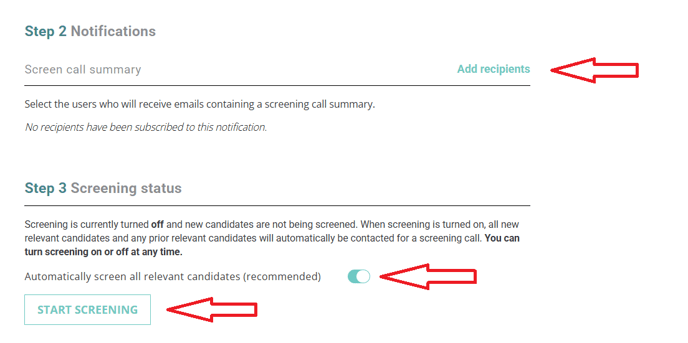
4 With the questions established and the summary notifications set, it’s time to decide if you would like Suzy to automatically screen all relevant candidates (the recommended and default option) or if you would like to choose candidates individually for screening. Remember, candidates are much more likely to complete a screen if they are contacted within the first 48 hours of applying and Suzy will reach out immediately.
5 Once you've made your screening type selection it’s time to activate Suzy. Click the Start Screening button under the last step and Suzy will begin sending out text messages to all candidates to schedule and conduct the phone screens.
6 The button will change to Stop Screening, allowing you to deactivate Suzy’s screening assistance at your convenience. As long as the job is active, you will continue receiving candidates but they will no longer be contacted by Suzy for a phone screen.